

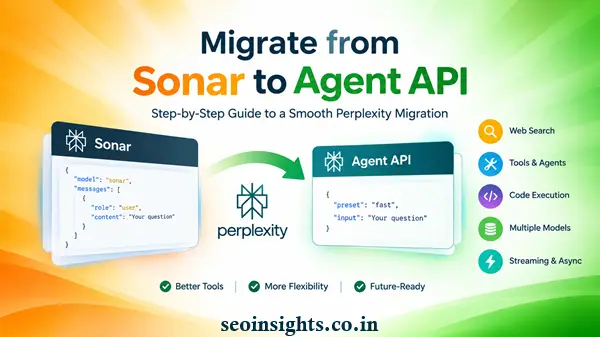
Learn how to migrate from Sonar to Perplexity Agent API, including endpoints, presets, inputs, outputs, web search, streaming, and async requests.
Migrate from Sonar to Agent API: What Changed?
Imagine that you have a production application that has been using Perplexity Sonar for months.
Your application sends a question to the Sonar API, receives a response, extracts the answer, and displays it to the user. Everything works.
Then the API architecture changes.
This is essentially the situation Sonar developers faced in 2026.
Perplexity’s Agent API is now the recommended interface for new projects and existing Sonar Chat Completions integrations. The Agent API is designed as a broader platform for model selection, web search, agentic workflows, code execution, MCP connections, and other tools.
The important point for developers is that this is not simply a matter of changing one model name.
The request endpoint, SDK method, input format, response structure, model configuration, search controls, streaming events, and asynchronous workflow can all require attention.
The good news is that the basic migration path is relatively straightforward.
Why Is Perplexity Moving From Sonar to the Agent API?
Sonar was primarily centered around chat completions with grounded web search.
The Agent API takes a broader approach.
Instead of treating search and model generation as a relatively fixed operation, the Agent API provides a unified interface where an application can use models together with tools and agentic capabilities.
These include:
- Web search
- URL fetching
- Code sandboxes
- MCP servers
- Finance search
- People search
- Multiple model families
- Configurable presets
- Multi-turn interactions
This makes the Perplexity Agent API useful beyond traditional search-answer applications.
For example, a simple application might ask:
“What are the latest developments in AI agents?”
A more advanced Agent API workflow could research several sources, execute code to analyze information, call external tools, and then produce a final response.
That difference explains why migration is more than a simple endpoint replacement.
What Happened to Sonar Chat Completions?
Perplexity’s documentation states that Sonar Chat Completions support ended on September 27, 2026.
There is an important distinction for existing applications.
Synchronous and streaming Sonar requests are being reformulated as Agent API requests as the rollout progresses by model.
However, asynchronous Sonar requests are not being reformulated and are no longer supported. Developers using asynchronous Sonar workflows need to move those workloads to Perplexity Agent API background mode.
For developers maintaining an older application, this means migration should be treated as a code and architecture update rather than something to postpone indefinitely.
Sonar vs Agent API: The Main Difference
At a high level, the request model changes from a traditional chat-completions structure to the Perplexity Agent API‘s Responses-style structure.
A typical Sonar request looks conceptually like this:
completion = client.chat.completions.create(
model=”sonar”,
messages=[
{“role”: “user”, “content”: “What are the latest developments in AI agents?”}
]
)
The Agent API uses:
response = client.responses.create(
preset=”fast”,
input=”What are the latest developments in AI agents?”
)
The difference may look small, but the application must also update how it reads the response.
Sonar commonly used:
completion.choices[0].message.content
The Perplexity Agent API provides:
response.output_text
This is one of the most important changes to check during migration.
Step 1: Change the Endpoint and API Method
The Agent API uses the /v1/agent endpoint.
With the Python SDK, the old pattern uses:
client.chat.completions.create()
The new pattern uses:
client.responses.create()
For a simple migration, you can think of the change this way:
Old:
/v1/sonar
chat.completions.create()
New:
/v1/agent
responses.create()
You also replace the Sonar model selection with an Agent API preset.
For example:
response = client.responses.create(
preset=”fast”,
input=”What are the latest developments in AI agents?”
)
A Practical Migration Tip
Do not immediately rewrite your entire application.
First create a small test request that performs exactly the same task as your existing Sonar call.
Once the new response is correct, update the surrounding application code.
This makes it much easier to identify whether a problem comes from the API migration or from unrelated application code.
Step 2: Change messages to input
This is another central migration step.
Sonar uses:
messages=[
{“role”: “user”, “content”: “…”}
]
The Agent API uses input.
For a simple prompt, the input can be a string:
input=”What are the latest developments in AI agents?”
If you need system instructions or a structured conversation, you can provide input items or use the top-level instructions field.
For example:
response = client.responses.create(
preset=”fast”,
instructions=”You are a concise research assistant.”,
input=[
{
“type”: “message”,
“role”: “user”,
“content”: “What are the latest developments in AI agents?”
}
]
)
This can make the migration cleaner because your application can separate general instructions from the actual user input.
Step 3: Update Response Handling
This is an easy place to introduce a migration bug.
A Sonar application may contain code like:
answer = completion.choices[0].message.content
With the Agent API, the simplest equivalent is:
answer = response.output_text
But there is an important difference when your application needs more than the final answer.
The Agent API’s output array can contain a trace of the work performed by the model.
That can include search results, tool activity, code execution information, and the final message.
Therefore, developers should decide what their application actually needs.
If You Only Need the Answer
Use:
response.output_text
If You Need Tool or Search Information
Inspect:
response.output
This is particularly useful for applications that need to audit or process the individual steps of an agentic workflow.
Step 4: Update Streaming Code
Streaming requires another change.
Sonar streaming applications commonly looked for incremental text inside a choice delta.
The Agent API uses typed server-sent events.
For answer text, applications should consume events of type:
response.output_text.delta
A Python example is:
stream = client.responses.create(
preset=”fast”,
input=”Explain quantum computing”,
stream=True
)
for event in stream:
if event.type == “response.output_text.delta”:
print(event.delta, end=””, flush=True)
This is important if your website, chatbot, dashboard, or application displays generated text while the response is being produced.
Do not simply copy the old Sonar streaming parser and expect it to work unchanged.
Step 5: Move Web Search Settings
One of Sonar’s major attractions was grounded web search.
The Agent API continues to support web search, but the configuration moves into the web_search tool.
For example, a Sonar request could have used:
search_recency_filter=”month”
search_domain_filter=[“iea.org”, “energy.gov”]
With the Agent API, these controls move under the web-search tool:
tools=[
{
“type”: “web_search”,
“filters”: {
“search_domain_filter”: [“iea.org”, “energy.gov”],
“search_recency_filter”: “month”
}
}
]
This reflects a broader architectural difference.
Search is now treated as a tool that an agent can use rather than merely a collection of top-level model parameters.
Why This Matters for SEO and Content Applications
Suppose you built an AI content research tool that asks:
“Find the latest Google Search developments from official Google sources.”
Your application may need to restrict searches to selected domains or recent information.
During migration, make sure those filters are preserved.
Otherwise, the new application may behave differently even though the main prompt has not changed.
Step 6: Choose the Correct Agent API Preset
One of the most important migration decisions is selecting the appropriate preset.
Perplexity documents the following mapping:
| Sonar workload | Agent API preset | Typical use |
| Sonar | fast | Quick facts, definitions and summaries |
| Sonar Pro | fast | Everyday research and lighter multi-step questions |
| Sonar Reasoning Pro | low | Multi-hop research and broader evidence gathering |
| Sonar Deep Research | high | Deep, demanding research |
For state-of-the-art deep research, Perplexity also points developers toward the xhigh preset.
This mapping should be treated as a starting point rather than an instruction to blindly replace one name with another.
Your application may have unusual requirements.
For example, a simple FAQ generator might be perfectly suited to fast, while a research workflow requiring extensive evidence gathering could benefit from a higher preset.
Test Your Real Workload
The safest approach is to compare the old and new implementations using real application prompts.
Test:
- Accuracy
- Citation quality
- Response format
- Latency
- Cost
- Search behavior
- Streaming behavior
- Error handling
Do not assume that two presets will produce identical output simply because Perplexity provides a migration mapping.
Step 7: Handle Asynchronous Requests
Asynchronous Sonar requests require special attention.
Perplexity states that asynchronous Sonar requests are no longer supported.
If your application previously submitted a long-running asynchronous Sonar request, the recommended direction is Agent API background mode.
This matters especially for:
- Research systems
- Large analysis jobs
- Automated reporting
- Scheduled data workflows
- Long-running agent tasks
Before migration, search your codebase for asynchronous Sonar calls rather than assuming all requests are synchronous.
Sonar Migration Example: Before and After
Here is a simplified conceptual comparison.
Before
from perplexity import Perplexity
client = Perplexity()
completion = client.chat.completions.create(
model=”sonar”,
messages=[
{
“role”: “user”,
“content”: “Explain the latest AI agent developments.”
}
]
)
print(completion.choices[0].message.content)
After
from perplexity import Perplexity
client = Perplexity()
response = client.responses.create(
preset=”fast”,
input=”Explain the latest AI agent developments.”
)
print(response.output_text)
The migration looks simple because the basic use case is simple.
The complexity appears when your application uses:
- Streaming
- Search filters
- Structured output
- Async processing
- Tool calls
- Multimodal input
- Custom functions
- Detailed response parsing
Those areas deserve separate testing.
Common Sonar-to-Agent-API Migration Mistakes
-
Only Changing the Model Name
Changing:
model=”sonar”
to another value is not a complete migration.
The API method, endpoint, request structure, and response parsing also need attention.
-
Keeping messages Everywhere
The Agent API uses input.
Simple prompts can become strings, while structured conversations can use input items or instructions.
-
Reading the Old Response Path
This can cause an otherwise successful API request to appear broken.
Check whether your application still expects:
choices[0].message.content
instead of:
output_text
-
Forgetting Streaming Changes
A streaming application needs to understand Agent API event types.
The old delta.content logic should not simply be reused without modification.
-
Losing Search Filters
If your application depended on search recency or domain filters, move those settings into the web_search tool configuration.
-
Ignoring Async Workloads
Synchronous migration and asynchronous migration are not the same.
Audit background jobs separately.
A Simple Migration Checklist
Before deploying the updated application, use this checklist:
- Replace the Sonar endpoint with the Agent API endpoint.
- Replace chat.completions.create() with responses.create().
- Replace messages with input.
- Review system instructions.
- Replace old response parsing with output_text where appropriate.
- Inspect output when tool or search details are required.
- Update streaming event handling.
- Move web-search filters into web_search.
- Select an appropriate Agent API preset.
- Test real production prompts.
- Review API costs and latency.
- Test error handling.
- Check asynchronous workloads.
- Move asynchronous workflows to background mode where required.
- Monitor the migrated application after deployment.
Is the Agent API Only for Existing Sonar Users?
No.
The Agent API is also positioned as the recommended interface for new projects.
That makes it relevant even if you are starting a new application rather than migrating an existing one.
Developers can use a unified interface for different model families and built-in tools instead of designing an application around a legacy Sonar Chat Completions workflow.
For a new project, it therefore makes more sense to learn the Agent API structure directly rather than building around the old Sonar API and migrating later.
How the Migration Changes the Developer Experience
The biggest conceptual change is that the API is moving from a relatively straightforward “send messages, receive an answer” model toward an agent-oriented workflow.
With Sonar, developers primarily thought about:
Prompt → Search → Answer
With the Agent API, the mental model can become:
Input → Model → Tools → Search/Code/External Systems → Output
That is a meaningful change.
For beginners, the important lesson is not to become overwhelmed by all the available features.
Start with a basic responses.create() request.
Once that works, introduce web-search controls.
Then add streaming, structured output, tools, or background processing only when the application needs them.
This incremental approach makes debugging much easier.
Practical SEO and Content-Marketing Use Cases
The migration is particularly interesting for SEO professionals building AI-assisted research tools.
For example, an SEO platform could use the Agent API to:
- Research a topic.
- Search current web sources.
- Restrict research to trusted domains.
- Analyze information.
- Produce a structured content brief.
- Return citations and research evidence.
A content team could then use that output to prepare:
- Topic clusters
- Content briefs
- Competitor research
- FAQ ideas
- Search-intent analysis
- Technical SEO research
- Current-events content research
However, AI-generated research should still be reviewed by a human before publication, particularly when the topic involves current events, technical specifications, regulations, finance, health, or other high-impact information.
Should You Migrate Now?
If you still have application code that directly depends on Sonar Chat Completions, migration is no longer something to plan for a distant future.
The documented Sonar Chat Completions support deadline was September 27, 2026.
For existing synchronous or streaming workloads, Perplexity’s current documentation describes the transition to Agent API requests as being rolled out by model.
For asynchronous workloads, the migration is more urgent because those Sonar requests are no longer supported.
The practical strategy is simple:
Audit → Migrate → Test → Monitor.
Do not wait until a production failure forces you to discover which part of your application still depends on Sonar.
Key Takeaways
- Migrate from Sonar to Agent API by moving from the Sonar chat-completions workflow to the Perplexity Agent API Responses interface.
- Replace messages with input and update your response handling to use output_text where appropriate.
- Sonar model choices map to Agent API presets, but production applications should validate the mapping against their own workloads.
- Web-search filters move into the web_search tool configuration.
- Streaming applications need to process typed Perplexity Agent API events rather than the old Sonar delta structure.
- Asynchronous Sonar requests are no longer supported and should be moved to Agent API background mode.
- For new applications, the Agent API is the recommended direction rather than building a new dependency on the older Sonar Chat Completions interface.
FAQ
-
What is the primary change when migrating from Sonar to Agent API?
The main change is moving from Sonar Chat Completions to the Perplexity Agent API Responses interface. This changes the endpoint, SDK method, input structure and response handling.
-
What replaces the Sonar messages parameter?
The Agent API uses input. A simple prompt can be supplied as a string, while structured conversations can use input items or the instructions field.
-
What replaces choices[0].message.content?
For applications that only need the generated answer, the Agent API provides response.output_text.
-
Which Agent API preset should replace Sonar?
Perplexity documents mappings such as Sonar to fast, Sonar Pro to fast, Sonar Reasoning Pro to low, and Sonar Deep Research to high. The xhigh preset is positioned for state-of-the-art deep research. Always test your actual workload before making a production decision.
-
Can I continue using asynchronous Sonar requests?
No. Perplexity’s current migration documentation says asynchronous Sonar requests are no longer supported. Those workflows should be moved to Agent API background mode.
Conclusion
The move from Sonar to the Perplexity Agent API is more than a model-name change, but it does not have to become a complicated rewrite.
For a basic application, the migration starts with a few clear changes: use the Agent API endpoint, switch to responses.create(), move prompts into input, select an appropriate preset, and read the answer from output_text.
From there, review the parts of your application that depend on streaming, web-search filters, structured output, tools, or asynchronous processing.
The most important migration principle is to preserve the behavior your application actually needs rather than mechanically replacing every Sonar field.
Start with one working request, test it against real application prompts, migrate the surrounding logic, and then gradually take advantage of the Agent API’s broader capabilities.
For developers building new AI-powered applications in 2026, the Agent API is also the more future-oriented architecture to learn. It provides a foundation for combining models, web research, tools, code execution and agentic workflows within a unified API.
Official reference: Perplexity’s current documentation for Migrate from Sonar to the Agent API and its detailed migration procedure should be checked before production deployment because API behavior and supported models can change over time.