

Learn how EmbeddingGemma 2 enables multimodal search, RAG, code retrieval, and vector embeddings across text, images, video, and audio.
Introduction: Why Embeddings Matter
Imagine building a search application for a company that stores everything in one place.
There are product descriptions, PDFs, source code, photographs, training videos, recorded meetings, and audio files. A user types a question and expects the system to find the right information regardless of whether the answer exists in text, an image, a video frame, or an audio recording.
Traditionally, developers might need several different models and processing pipelines to handle these formats.
That is where EmbeddingGemma 2 becomes interesting.
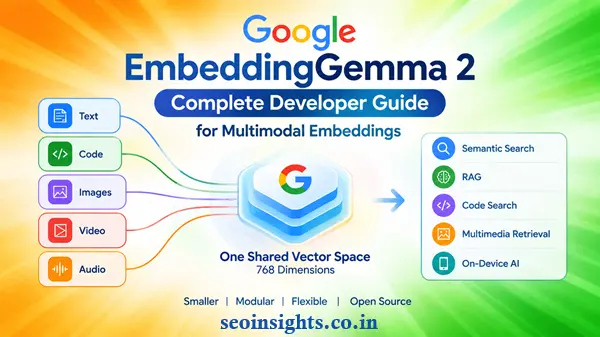
Google DeepMind has introduced EmbeddingGemma 2 as a compact, open multimodal embedding model designed to represent text, code, images, video, and audio in a shared vector space. This makes it possible to compare different types of content using semantic similarity rather than relying only on exact keyword matches.
The model is based on the Gemma 4 architecture and is available under the Apache 2.0 license.
For developers, the important question is not simply “What is EmbeddingGemma 2?”
It is:
How can EmbeddingGemma 2 make search and retrieval applications simpler, smaller, and more flexible?
Let’s explore it step by step.
What Is EmbeddingGemma 2?
EmbeddingGemma 2 is a multimodal embedding model designed to convert different types of information into numerical vector representations called embeddings.
Instead of treating a sentence, photograph, video frame, or audio recording as completely unrelated data, the model places their representations into a common 768-dimensional vector space.
This enables applications to compare their semantic meaning.
For example, imagine a media library containing:
- A photograph of a sunset at a beach
- An audio recording of ocean waves
- A text description saying “sunset over the ocean”
- A video showing waves on a beach
A semantic search system can use embeddings to determine that these items are related, even though their original formats are different.
That is one of the main ideas behind EmbeddingGemma 2.
How EmbeddingGemma 2 Works
EmbeddingGemma 2 uses modular encoders that process different modalities while projecting their representations into the same vector space.
The available components include:
Text and Code
The base configuration contains the text and code component and uses 270 million parameters.
This configuration is useful when your application primarily needs:
- Semantic text search
- Document retrieval
- Code search
- RAG
- Text classification
- Similarity comparison
For example, a developer could index a large software repository and allow users to search it using natural-language questions.
A query such as:
“Where is user authentication handled?”
could retrieve relevant functions or files even when those files do not contain the exact words used in the question.
Vision
The vision component adds support for images, visual documents, and video frames.
This opens up applications such as:
- Image search
- Visual document retrieval
- Product discovery
- Image-to-text search
- Video retrieval
- Cross-modal search
A user could type “waterproof hiking shoes” and retrieve product images whose visual and semantic representation is relevant to the query.
Audio
The audio component enables audio and speech-related retrieval.
This can be useful for:
- Meeting recordings
- Podcasts
- Voice archives
- Audio search
- Spoken-query retrieval
- Multimedia knowledge bases
The important concept is that audio does not necessarily have to be converted into text before it can participate in an embedding-based retrieval workflow.
EmbeddingGemma 2 Model Sizes
One of the practical strengths of EmbeddingGemma 2 is its modular architecture.
Developers do not have to load every modality when their application does not need them.
The configurations include:
| Configuration | Parameters | Main Use |
| Text + code | 270M | Text and code retrieval |
| Text + vision | 440M | Text, images and video |
| Text + audio | 570M | Text and audio |
| Full multimodal | 740M | Text, code, images, video and audio |
This makes the model more adaptable to different hardware and application requirements.
If you are building a text-only search engine, loading the full multimodal model may be unnecessary.
If you are developing a multimedia search engine, however, the larger configuration may make more sense.
Using EmbeddingGemma 2 With Sentence Transformers
Google’s developer guide demonstrates EmbeddingGemma 2 with the Sentence Transformers library.
You can install the required packages with:
pip install -U sentence-transformers[image,audio,video] transformers
The model can then be loaded using its model identifier:
from sentence_transformers import SentenceTransformer
MODEL_ID = “google/embeddinggemma-2”
model = SentenceTransformer(MODEL_ID)
This loads the full multimodal configuration.
Loading Only the Components You Need
If you only need text and code, unnecessary modality encoders can be disabled.
For example:
text_only_model = SentenceTransformer(
MODEL_ID,
config_kwargs={
“vision_config”: None,
“audio_config”: None,
},
)
This is an important optimization for developers working with limited memory.
Instead of thinking:
“How can I run the biggest model?”
it is often better to ask:
“Which parts of the model does my application actually need?”
That small change in thinking can make deployment more efficient.
Using Task Prompts for Better Retrieval
EmbeddingGemma 2 supports task-specific prompts for text.
This matters because a search query and a document serve different purposes.
For example:
query = “What causes the northern lights?”
document = “The northern lights are caused by charged particles from the sun.”
query_emb = model.encode(
query,
prompt_name=”SearchQuery”
)
doc_emb = model.encode(
document,
prompt_name=”Document”
)
print(model.similarity(query_emb, doc_emb))
The query and document are therefore encoded according to their roles in a retrieval task.
For production applications, developers should follow the task-specific prompt guidance rather than treating every input as an identical type of text.
Multimodal Search With EmbeddingGemma 2
Now consider a more interesting example.
Suppose an ecommerce platform contains:
- Product descriptions
- Product photographs
- Demonstration videos
- Customer audio reviews
A customer searches:
“Lightweight waterproof trail shoes.”
The application can generate a query embedding and compare it with representations from different content types.
For example:
image_emb = model.encode({
“image”: “trail_shoe.jpg”
})
audio_emb = model.encode({
“audio”: “customer_review.wav”
})
query_emb = model.encode(
“lightweight waterproof trail shoes”,
prompt_name=”SearchQuery”
)
print(model.similarity(query_emb, image_emb))
print(model.similarity(query_emb, audio_emb))
The result is a search system that can work across modalities rather than maintaining completely separate search experiences.
Embedding Text, Images and Video Together
EmbeddingGemma 2 can also work with interleaved multimodal content.
Consider a product listing containing a description, photograph, and demonstration video.
The content can be represented together:
listing_emb = model.encode({
“text”: “Waterproof trail shoe. <|image|> Grip test on wet rock: <|video|>”,
“image”: “trail_shoe.jpg”,
“video”: “grip_test.mp4”,
})
query_emb = model.encode(
“waterproof trail shoes”,
prompt_name=”SearchQuery”
)
print(model.similarity(query_emb, listing_emb))
This is particularly interesting for applications where the meaning of a record depends on multiple content types.
EmbeddingGemma 2 and RAG
Retrieval-Augmented Generation, or RAG, is another major use case.
A typical RAG application follows this pattern:
- Collect documents and other knowledge sources.
- Break the information into searchable units.
- Generate embeddings.
- Store the vectors in a vector database or search index.
- Convert a user’s question into an embedding.
- Retrieve semantically similar content.
- Provide the retrieved information to a generative model.
- Generate the final response.
EmbeddingGemma 2 can perform the embedding and retrieval part of this workflow.
For example, a company could build an internal assistant that searches:
- Documentation
- Source code
- Product manuals
- Images
- PDFs
- Recorded meetings
This is especially useful when the organization’s knowledge is not stored exclusively as text.
EmbeddingGemma 2 for Code Search
Code retrieval is another important area.
Imagine a developer joins a large software project with thousands of files.
Instead of manually searching for keywords, they could ask:
“Where does the application validate user permissions?”
A semantic embedding system can retrieve code based on meaning and intent.
Google reports that EmbeddingGemma 2 improves over EmbeddingGemma 1 on code-related evaluation and highlights code search as a target use case.
For developers maintaining large repositories, this could make embedding-based code discovery particularly useful.
What Is Matryoshka Representation Learning?
One of the most practical features of EmbeddingGemma 2 is support for Matryoshka Representation Learning (MRL).
The full embedding has 768 dimensions.
However, applications do not always need all 768 dimensions.
MRL allows developers to truncate embeddings to smaller dimensions such as:
- 512
- 256
- 128
The advantage is simple:
Fewer dimensions mean less storage and potentially faster vector operations.
For example, Google’s guide gives an example where one million 768-dimensional vectors in bfloat16 require roughly 1.5 GB, while 128-dimensional vectors require about 250 MB.
That represents a substantial reduction for large indexes.
Which Embedding Dimension Should You Choose?
There is no single best dimension for every application.
768 Dimensions
Use the full representation when:
- Retrieval quality is the priority.
- Storage is not a major constraint.
- You need multimodal retrieval.
- You are working with visually rich data.
512 Dimensions
This can be a useful middle ground when you want to reduce storage while maintaining a relatively large representation.
256 Dimensions
Google’s developer guide highlights 256 dimensions as a practical storage-conscious configuration.
It can retain much of the original quality while reducing storage requirements.
128 Dimensions
The smallest supported option can be attractive for large text indexes or first-stage retrieval.
However, developers should validate quality on their own datasets, particularly when working with images, video, or speech.
The lesson is important:
Do not choose the smallest vector simply because it saves storage. Measure retrieval quality first.
A Practical EmbeddingGemma 2 Workflow
Suppose you are building a document search system.
A sensible development process would look like this:
Step 1: Identify Your Content
Determine whether your application contains:
- Text
- Code
- Images
- Video
- Audio
Do not enable modalities that your application does not require.
Step 2: Start With the Smallest Useful Configuration
For a text-only application, start with the 270M configuration.
For image and video retrieval, add vision.
For audio retrieval, add audio.
Step 3: Generate Embeddings
Convert your source content into embeddings.
For text retrieval, use the appropriate task prompts for queries and documents.
Step 4: Store the Vectors
Store the embeddings in your preferred vector database or search infrastructure.
Keep the embedding dimension consistent between vectors that will be compared.
Step 5: Test Retrieval Quality
Create realistic test queries.
Measure whether the correct documents, images, videos, or audio files appear near the top of the results.
Step 6: Optimize Storage
Only after establishing a quality baseline should you experiment with 512-, 256-, or 128-dimensional vectors.
Step 7: Monitor Real-World Performance
A benchmark is useful, but your own data matters.
Test:
- Search relevance
- Latency
- Memory consumption
- Storage requirements
- False matches
- Missed results
EmbeddingGemma 2 vs Traditional Keyword Search
Keyword search and semantic search solve different problems.
Suppose a document says:
“A sudden interruption of electrical power may cause the server to restart.”
A user searches:
“Why did my server reboot after losing electricity?”
Traditional keyword search may struggle because the wording differs.
Semantic embeddings can recognize that the two pieces of text express a related concept.
That does not mean keyword search is obsolete.
In many production systems, combining lexical search with semantic retrieval can provide stronger results than relying exclusively on one approach.
EmbeddingGemma 2 for On-Device AI
EmbeddingGemma 2 is particularly interesting for edge and local AI applications because of its relatively compact architecture.
Potential applications include:
- Offline search
- Mobile document retrieval
- Local media search
- Privacy-sensitive knowledge systems
- On-device RAG
- Personal information search
- Local code search
For an application where data should remain on a device, local embeddings can reduce the need to send every piece of content to a remote service.
However, actual performance will depend on the hardware, workload, model configuration, and implementation.
Important Developer Considerations
Before putting EmbeddingGemma 2 into production, consider several practical issues.
Validate Your Own Data
A model’s published benchmark results are not a substitute for testing your application.
Your content may contain:
- Industry-specific terminology
- Unusual document structures
- Multiple languages
- Noisy audio
- Specialized source code
- Highly visual information
Create a representative evaluation set and measure retrieval quality.
Keep Query and Document Processing Consistent
When using embeddings for retrieval, use the appropriate task prompts and ensure that the dimensions and normalization settings are compatible.
Avoid Unnecessary Modalities
If your application only performs text search, there is little reason to load image and audio encoders.
Modularity exists for a reason.
Evaluate Storage Before Scaling
A vector database containing millions of embeddings can consume significant memory.
MRL provides an opportunity to reduce the footprint, but the smaller vector should be selected only after measuring its effect on retrieval quality.
Consider Privacy and Security
Embeddings are not automatically a security boundary.
Applications should still implement appropriate access controls, filtering, data governance, and evaluation.
A vector representation should not be treated as permission to retrieve information that a user is not authorized to access.
Where to Learn More About EmbeddingGemma 2
The best place to start is Google’s official developer material because the model and APIs can evolve.
Official Google Developers Blog:
https://developers.googleblog.com/embeddinggemma-2-the-developer-guide/
Developers can also consult the official Google AI documentation for model details, inference examples, and multimodal embedding workflows.
The model weights are available through Hugging Face, while Sentence Transformers provides the integration demonstrated in Google’s developer guide.
Key Takeaways
- EmbeddingGemma 2 is a compact multimodal embedding model from Google DeepMind.
- It represents text, code, images, video, and audio in a shared 768-dimensional vector space.
- Its modular design allows developers to load only the encoders they need.
- Sentence Transformers provides a practical way to generate and compare embeddings.
- Task-specific prompts can improve text retrieval workflows.
- Matryoshka Representation Learning can significantly reduce vector storage requirements.
- Developers should benchmark different configurations against their own data before production deployment.
FAQ
-
What is EmbeddingGemma 2?
EmbeddingGemma 2 is a multimodal embedding model from Google DeepMind that converts text, code, images, video, and audio into representations that can be compared in a shared vector space.
-
What can EmbeddingGemma 2 be used for?
It can support semantic search, RAG, code search, multimedia retrieval, similarity comparison, classification, clustering, and other applications that rely on embeddings.
-
How many parameters does EmbeddingGemma 2 have?
The complete multimodal configuration has 740 million parameters. Developers can use smaller configurations, including a 270 million parameter text-and-code setup, depending on which modalities are required.
-
Can EmbeddingGemma 2 work with images and audio?
Yes. EmbeddingGemma 2 supports text, code, images, video, and audio, allowing different modalities to be represented in a shared embedding space.
-
Why does EmbeddingGemma 2 support different embedding dimensions?
Different applications have different storage and performance requirements. Matryoshka Representation Learning allows embeddings to be truncated to smaller dimensions, such as 512, 256, or 128, which can reduce storage requirements.
Conclusion
The interesting part of EmbeddingGemma 2 is not simply that it is another embedding model.
Its bigger idea is bringing multiple types of information into a common retrieval space while keeping the model compact and modular.
A developer building a text search engine can start with the smaller configuration. Someone building a multimedia search application can add vision and audio. A large vector index can experiment with shorter embeddings to reduce storage. A RAG system can use the model to retrieve information before passing relevant context to a generative model.
That flexibility makes EmbeddingGemma 2 worth watching for developers working on semantic search, RAG, code intelligence, and on-device AI.
The most sensible way to evaluate it is not to assume that one configuration will be ideal for everyone. Start with your actual data, select only the modalities you need, establish a retrieval-quality baseline, and then optimize dimensions, memory, and latency.
For developers interested in the next generation of local and multimodal search, EmbeddingGemma 2 provides an interesting foundation to experiment with.
Official source: Google Developers Blog — EmbeddingGemma 2: The Developer Guide
The technical details above are aligned with Google’s developer guide and official EmbeddingGemma 2 documentation, including the 270M/440M/570M/740M configurations, 768-dimensional shared space, Sentence Transformers integration, task prompts, and MRL options. Google Developers Blog