

Discover GPT-6.1 Terra features, pricing, computer use, visual reasoning and API access. Learn how this efficient OpenAI model can automate everyday work.
GPT-6.1 Terra: Features, Pricing, Benchmarks and Practical Uses
Highlights
- Efficient AI for everyday work: GPT-6.1 Terra combines visual reasoning, computer use and natural writing.
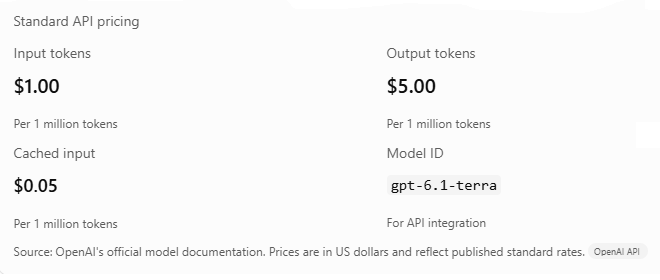
- Lower API pricing: OpenAI lists standard input pricing at $1 per million tokens and output pricing at $5 per million tokens.
- Computer-use capabilities: The model can help agents interact with application screens and complete multistep tasks.
- Improved performance: OpenAI reports substantial gains over GPT-5.6 Terra on selected computer-use, factuality and coding evaluations.
- Developer access: The API model identifier is gpt-6.1-terra.
- Best use cases: Document processing, visual analysis, routine business workflows and software-assisted automation, with appropriate human review.
Introduction
Imagine receiving hundreds of invoices, reviewing product photographs, updating information in a business application, or extracting details from technical drawings. These tasks may be straightforward individually, but completing them repeatedly can consume hours of valuable working time.
This is the type of work that GPT-6.1 Terra, OpenAI’s latest model announced on October 26, 2026, is designed to help with. It combines visual understanding, computer interaction and natural-language capabilities to support practical workflows across digital applications.
Unlike an AI model used only to answer questions, a model with computer-use capabilities can also serve as part of an agent that interprets a screen, chooses an action and works through a sequence of application tasks.
For beginners, developers, digital marketers and business owners, the important questions are simple: What can GPT-6.1 Terra actually do? How much does it cost? And when should you use it instead of another AI model?
This guide explains the technology, its practical applications, limitations and implementation considerations in straightforward language.
What Is GPT-6.1 Terra?
GPT-6.1 Terra is an AI model from OpenAI designed for efficient professional work, particularly tasks involving visual reasoning, computer interaction and clear writing.
Its capabilities make it relevant to workflows where an AI system must interpret information and help act on it, rather than simply generate a text response. Developers can access the model through the OpenAI API, while eligible users can access it in ChatGPT Work and Codex.
Consider an online retailer that receives product photographs and inventory spreadsheets. A workflow built around GPT-6.1 Terra could help identify visual characteristics, match images to catalogue entries, and prepare structured information for an inventory system.
The model does not automatically eliminate the need for software integration, business rules or human supervision. Those elements still determine how reliably an entire workflow operates.
What makes GPT-6.1 Terra different?
Three capabilities define its intended role:
- Visual reasoning: Interpreting images, diagrams, screenshots and other visual information.
- Computer use: Supporting agents that interact with software interfaces to carry out tasks.
- Natural writing: Drafting, revising and communicating information in a clear, readable form.
OpenAI positions Terra as a fast, efficient option for routine and high-volume professional workloads. For the most demanding reasoning, coding and research tasks, the company recommends considering its more capable models where appropriate.
Key Features of GPT-6.1 Terra
1. Visual reasoning and image understanding
GPT-6.1 Terra can process visual input and reason about what it contains. This makes it useful when information is presented as an image rather than neatly organized text.
Potential applications include:
- Extracting relevant details from business documents.
- Comparing product photographs with catalogue records.
- Interpreting technical diagrams.
- Reviewing screenshots to identify interface elements.
- Organizing visual observations into written reports.
For example, a digital marketing team could use a visual-analysis workflow to review a collection of advertising creatives and categorize them by layout, message and visible call to action.
Practical limitation: Visual interpretation can still be incorrect. Low-resolution images, obscured text, ambiguous diagrams and inconsistent formatting may reduce accuracy. Important values should be checked against the original source.
2. Computer-use capabilities
Computer use allows an AI agent to work with software interfaces, rather than relying exclusively on conventional text exchanges.
Depending on the tools and permissions provided, an agent can use these capabilities to help with tasks such as navigating an application, entering information, reviewing displayed results and completing multiple steps.
For example, a business workflow might involve:
- Opening an invoice-processing application.
- Reviewing the invoice details.
- Matching the invoice to an existing supplier record.
- Entering the relevant information.
- Flagging missing or inconsistent fields for review.
The complete workflow requires suitable application access, tools and instructions. The model alone does not guarantee that every step will execute correctly.
OpenAI’s documentation lists computer use among the tools supported through the Responses API.
3. Clear writing and document assistance
GPT-6.1 Terra is also intended for communication-heavy tasks.
It can support workflows involving:
- Drafting business proposals.
- Summarizing documents.
- Rewriting reports for different audiences.
- Preparing structured notes from source material.
- Editing existing text for clarity and consistency.
For an SEO professional, this could mean turning approved research notes into an initial article outline or creating a summary of a content audit.
The recommended approach is to use the model for drafting and organization while verifying factual claims, links, search intent and editorial quality before publication.
4. More efficient high-volume workflows
Automation becomes especially valuable when a task must be repeated many times.
Imagine processing 1,000 product records. A workflow could use AI to interpret product images, identify likely matches, produce structured results and send uncertain cases to a human reviewer.
The benefit depends on the entire workflow, including the quality of the source data, application response times, error handling and the amount of manual review required.
OpenAI reports improvements in task performance and cost efficiency for GPT-6.1 Terra compared with its predecessor on selected evaluations. These results are encouraging, but they do not establish that every business workflow will be faster or cheaper.
GPT-6.1 Terra Pricing
Pricing is an important consideration for developers who want to process large numbers of documents, images or application tasks.
OpenAI’s published standard API rates are shown below.
How much would API tokens cost?
Suppose an application processes 100,000 input tokens and generates 20,000 output tokens.
The estimated text-token cost would be:
| Usage | Calculation | Cost |
| Input | 100,000 ÷ 1,000,000 × $1 | $0.10 |
| Output | 20,000 ÷ 1,000,000 × $5 | $0.10 |
| Total | $0.20 |
This is an illustrative calculation using the published standard token rates. It excludes any additional tool-call charges, infrastructure costs, retries or other expenses associated with running a complete application.
Important: Token charges are not the same as the total cost of computer automation. A workflow involving multiple screenshots, browser actions or repeated model calls may cost more than a simple text exchange.
Is GPT-6.1 Terra cheaper than other OpenAI models?
OpenAI states that GPT-6.1 Terra’s standard API prices are 50% lower than those of GPT-5.6 Terra and GPT-6.1 Sol. The company also reports substantial cost advantages on selected benchmark tasks.
However, the lowest price per token does not always translate into the lowest total cost.
When comparing models, measure:
- The number of model calls needed to finish a task.
- The percentage of tasks completed correctly.
- The amount of human correction required.
- Tool-use and infrastructure expenses.
- Total cost per successfully completed task.
This approach is more useful than comparing API rates alone.
GPT-6.1 Terra Benchmarks and Performance
Benchmarks help evaluate how a model performs on defined tasks. They are useful for comparing capabilities, but they should not be treated as guarantees of real-world results.
OpenAI highlights several evaluations in its GPT-6.1 Terra announcement.
| Benchmark or evaluation | What it measures | Why it matters |
| Agents’ Last Exam | Professional tasks involving agent-based work | Evaluates complex, practical workflows |
| MMMU-Pro | Multimodal understanding and visual reasoning | Helps assess interpretation of visual information |
| OSWorld 2.1 | Interacting with desktop applications | Relevant to computer-use automation |
| Terminal-Bench 4.0 | Coding tasks performed through a terminal | Useful for assessing software-engineering performance |
| Terminal-Bench-Science 0.1 | Scientific tasks involving code and research | Tests a more specialized problem-solving area |
What did OpenAI report?
The announcement includes several notable results:
- On Agents’ Last Exam at medium reasoning effort, GPT-6.1 Terra scored 15 percentage points higher than GPT-5.6 Terra, according to OpenAI.
- On the company’s internal benchmark of error-inducing prompts, the reported factual error rate at low reasoning effort fell from 53.6% for GPT-5.6 Terra to 16.7% for GPT-6.1 Terra.
- At maximum reasoning effort, OpenAI reports a 50.3% score for GPT-6.1 Terra on Terminal-Bench 4.0, compared with a published 21.5% score for GPT-5.6 Terra.
These are vendor-reported results, not independent guarantees of accuracy or performance in your own environment. Different test conditions, task designs and software configurations can produce different outcomes.
How should businesses interpret these results?
A benchmark improvement is a reason to test the model, not a reason to automate an entire business process without validation.
For example, a company considering invoice automation should evaluate the model on its own invoices. The test set should include clean documents, unusual layouts, missing values and examples that require escalation.
Track both successful completion and the consequences of mistakes. An incorrect invoice amount can be more serious than an imperfect summary, so different tasks require different acceptance criteria.
Practical Uses of GPT-6.1 Terra
The strongest use cases are workflows in which visual information, software interaction and written communication come together.
1. Invoice and document processing
AI can help read incoming documents, extract key fields and prepare information for accounting systems. Use validation rules to check totals, supplier identities and missing details before records are finalized.
2. SEO and digital marketing
Marketers can use AI-assisted workflows to summarize approved research, classify creative assets, prepare content briefs and organize campaign findings. Search data, factual claims and final recommendations still need verification.
3. E-commerce product catalogues
Visual analysis can help match photographs with catalogue entries, identify inconsistent product information and prepare descriptions. Human review is important when similar-looking products could be confused.
4. Software testing and routine coding
Developers can evaluate the model for interface troubleshooting, routine coding assistance and multistep software tasks. Complex engineering work may require a more capable model or additional specialist tools.
These are potential applications based on the model’s documented capabilities. Actual suitability depends on the workflow, permissions, available tools and testing results.
How to Get Started With GPT-6.1 Terra
Beginners can start with a small, well-defined task before attempting a fully automated workflow.
Step 1: Choose the right access method
OpenAI provides different ways to use the model.
- ChatGPT Work: For eligible users who want assistance with professional tasks.
- Codex: For supported coding and software-development workflows.
- OpenAI API: For developers building applications and automated processes.
The announcement identifies Plus, Pro, Enterprise and Edu users as eligible for GPT-6.1 Terra in ChatGPT Work and Codex, while developers can access the model through the API. Check the official product documentation for current access and account requirements.
Step 2: Define a specific task
Avoid starting with a vague instruction such as “automate my entire business.”
Instead, specify one measurable outcome, such as:
- Extract invoice numbers and totals from a set of documents.
- Compare product photographs with a small catalogue.
- Review a group of web page screenshots for visible layout issues.
- Prepare a structured report from approved source documents.
A narrowly defined task is easier to evaluate and troubleshoot.
Step 3: Provide clear instructions
Good instructions explain the goal, the permitted actions, the expected output and the conditions under which the agent should stop.
For example:
Example prompt: invoice review
Review the supplied invoices and extract the supplier name, invoice number, invoice date and total amount. Return one structured record per invoice. If a field is missing or unclear, mark it for human review instead of guessing. Do not submit payments or change financial records.
Copy prompt
This example establishes a clear boundary between extracting information and performing consequential actions.
Step 4: Test with representative examples
Use a small test set that reflects the documents or applications you encounter in normal work.
Include both straightforward examples and difficult cases. Compare the model’s results with verified answers, record errors and improve the instructions or validation process.
Step 5: Add tools and permissions carefully
If you are building an API-based agent, configure only the tools and permissions it actually needs.
For computer-use workflows, consider:
- Restricting access to approved applications.
- Requiring confirmation before sending, deleting or submitting important information.
- Logging actions and errors.
- Protecting credentials and confidential data.
- Providing a safe way to stop or recover a failed workflow.
Step 6: Measure the results
Compare the AI-assisted workflow with your existing process.
Measure completion time, error rate, cost per successful task and human-review effort. Expand the workflow only when the results justify doing so.
GPT-6.1 Terra API: A Beginner-Friendly Overview
Developers can call the model through the OpenAI API using the model identifier gpt-6.1-terra. OpenAI’s documentation lists support for the Responses API and computer-use tools.
A basic text request can look like this:
from openai import OpenAIclient = OpenAI()response = client.responses.create( model=”gpt-6.1-terra”, input=”Explain three practical uses of AI automation for a small business.”)print(response.output_text)
This example demonstrates a basic text interaction. It does not automate a desktop application or access private business records.
To build a computer-use agent, developers need to follow the official computer-use documentation, configure the supported tools and implement the required execution environment. They should not assume that a simple text request can operate a browser or desktop on its own.
Reasoning settings
The official model documentation lists these reasoning-effort options:
- none
- low
- medium
- high
- xhigh
- max
The default is medium.
For routine tasks, start with a lower setting if it meets your quality requirements. For difficult tasks, compare higher settings using the same representative test cases.
The best setting is the one that delivers acceptable results at a suitable cost and speed for your application.
GPT-6.1 Terra vs GPT-5.6 Terra vs GPT-6.1 Sol
Choosing a model requires balancing performance, cost and the nature of the task.
| Model | General positioning | Consider it for |
| GPT-6.1 Terra | Fast, efficient visual reasoning and computer use | Routine professional tasks and high-volume workflows |
| GPT-5.6 Terra | Earlier Terra model | Existing workflows that need to be evaluated before migration |
| GPT-6.1 Sol | More capable option for complex work | Demanding coding, reasoning and professional tasks |
OpenAI positions GPT-6.1 Terra as a significant improvement over GPT-5.6 Terra on selected evaluations and recommends Sol or Astra for its most complex coding and reasoning needs.
Which model should you choose?
Choose GPT-6.1 Terra if your main objective is to improve the efficiency of visual and computer-based workflows.
Consider GPT-6.1 Sol when a task needs stronger reasoning or more demanding software-engineering capabilities. For the most complex work, compare GPT-6 Astra as well.
If you already use GPT-5.6 Terra, test your existing prompts, images and workflows against the new model before switching. Better benchmark scores do not guarantee identical behavior in your particular application.
Limitations and Risks of GPT-6.1 Terra
No AI model should be treated as infallible. Its practical value depends on the task, the information supplied and the safeguards around its use.
1. Incorrect information
The model may misread a document, misunderstand an instruction or produce an inaccurate answer. Validate important values against authoritative records.
2. Computer-use errors
An agent can interact with the wrong interface element or make an unintended change. Use restricted permissions, checkpoints and human approval for consequential actions.
3. Prompt injection
Web pages, documents and other external content may contain malicious instructions intended to redirect an AI agent away from its task.
OpenAI reports testing Terra’s resistance to prompt injection and says it retains protections from the GPT-6 Astra model family. Such safeguards reduce risk but should not replace application-level security controls.
4. Privacy and confidential data
Before sending customer information, invoices or internal documents to an AI workflow, review the applicable account settings, organizational policies and data-handling requirements.
Avoid exposing passwords, API keys or unnecessary personal information. Use appropriate access controls and secure storage.
5. Unexpected operating costs
Repeated tool calls, retries and long-running tasks can increase expenses. Set usage limits, monitor token consumption and calculate the cost of successfully completed tasks.
6. Not every task needs an advanced model
A simple classification rule, spreadsheet formula or conventional software integration may be more predictable and cheaper than using an AI agent.
Use AI where interpreting ambiguous information or adapting to changing inputs provides a meaningful advantage.
Best Practices for Using GPT-6.1 Terra
To get better results, combine clear instructions with sensible technical controls.
- Start with one workflow. Prove value before expanding to more applications.
- Define success in measurable terms. Set acceptable accuracy, speed and cost thresholds.
- Use structured outputs where appropriate. Validate required fields and data types before passing results to other systems.
- Keep a human in the loop. Review uncertain cases and require approval for high-impact actions.
- Use least-privilege access. Give the agent only the permissions necessary for its task.
- Test difficult examples. Include incomplete documents, unexpected layouts and ambiguous instructions.
- Monitor performance after deployment. Applications, data and user behavior can change over time.
- Compare total workflow costs. Include tool calls, retries, human review and maintenance, not just token prices.
These practices help make an AI-assisted workflow more dependable, regardless of the model selected.
How GPT-6.1 Terra Could Help SEO Professionals
For readers working in SEO and digital marketing, GPT-6.1 Terra is most interesting as a potential assistant for repetitive, information-heavy tasks.
Content research and planning
A workflow could organize approved research notes, group related topics and prepare article briefs. Writers should verify facts and ensure the final article meets search intent rather than relying on generated text alone.
Visual website audits
An agent could assist with reviewing screenshots for visible layout problems, missing interface elements or inconsistent presentation. A screenshot-based review cannot replace a full technical audit of HTML, indexing directives, structured data or server behavior.
Advertising creative analysis
Teams could categorize visual assets by format, message and creative elements. Performance decisions should still use actual campaign data rather than visual impressions alone.
Reporting and documentation
AI-assisted workflows could summarize exported reports and prepare draft explanations for clients. Validate the figures and preserve the source of every important metric.
Can GPT-6.1 Terra improve Google rankings?
Not directly or automatically. Using an AI model does not guarantee better rankings.
Its value for SEO depends on whether it helps produce more useful content, identify genuine technical issues or make research and reporting more efficient. Human expertise, original value, accurate information and sound technical implementation remain essential.
For a practical SEO workflow, begin with a bounded task such as organizing Search Console exports or preparing a draft content brief. Measure the time saved and verify every important output before expanding the process.
Official Resources for GPT-6.1 Terra
Use official documentation for the most reliable information about access, pricing and implementation.
- OpenAI’s GPT-6.1 Terra announcement — Features, benchmark results and availability.
- GPT-6.1 Terra API model documentation — Model identifier, pricing, supported capabilities and reasoning settings.
- OpenAI’s guide to choosing models — Guidance for selecting a model for different workloads.
These resources should be checked before implementation because model availability, pricing and supported features may change.
Key Takeaways
- GPT-6.1 Terra is built for efficient professional work. Its key strengths include visual reasoning, computer use and natural writing.
- API pricing is relatively accessible. OpenAI lists standard rates of $1 per million input tokens and $5 per million output tokens, excluding additional workflow expenses.
- Computer-use automation requires more than a model. Applications need appropriate tools, permissions, execution environments and error handling.
- Benchmarks are useful but not guarantees. Test the model on representative tasks before using it in production.
- Choose the model based on the workload. Terra suits efficient routine tasks, while more demanding work may benefit from GPT-6.1 Sol or GPT-6 Astra.
- Security and human review matter. Protect confidential information and require approval for sensitive or irreversible actions.
- SEO benefits depend on implementation. Use AI to improve research and workflows, not as a substitute for accurate, useful content.
FAQ
1. What is GPT-6.1 Terra?
GPT-6.1 Terra is an OpenAI AI model designed for visual reasoning, computer-use workflows and clear writing. It supports applications ranging from document processing to software-assisted business automation.
2. What is GPT-6.1 Terra used for?
Common potential uses include invoice processing, image analysis, product catalogue management, document drafting, routine coding assistance and interacting with supported software interfaces.
3. How much does GPT-6.1 Terra cost?
OpenAI’s published standard API pricing is $1 per million input tokens, $0.05 per million cached input tokens and $5 per million output tokens. Tool calls and other workflow expenses may add to the total cost.
4. How can developers access GPT-6.1 Terra?
Developers can use the OpenAI API with the model identifier gpt-6.1-terra. The official model documentation explains its supported capabilities, pricing and configuration options.
5. Is GPT-6.1 Terra better than GPT-5.6 Terra?
OpenAI reports improvements in visual reasoning, computer-use performance, factuality and selected coding evaluations. The practical difference depends on your workload, so compare both models using the same representative test cases.
6. Can GPT-6.1 Terra control a computer?
It supports computer-use workflows through compatible tools and an appropriate execution environment. An agent can use these capabilities to interact with supported interfaces, but reliable operation requires permissions, testing and safeguards.
7. Is GPT-6.1 Terra suitable for beginners?
Yes, beginners can explore it through eligible ChatGPT Work experiences or learn to use it through the API with basic programming knowledge. Starting with a simple task and clear instructions is the easiest way to understand its capabilities.
8. Can GPT-6.1 Terra help with SEO and digital marketing?
It can assist with content planning, visual asset analysis, report summaries and repetitive marketing workflows. However, keyword research, factual verification, campaign analysis and final editorial decisions still require appropriate validation.
Conclusion
GPT-6.1 Terra represents an important development in practical AI automation by combining visual understanding, computer interaction and natural writing with an emphasis on efficiency. Its potential value lies in helping people complete repetitive digital tasks more effectively, rather than simply generating answers.
For beginners, developers and digital marketing professionals, the best starting point is a small, measurable workflow. Test the model with real examples, compare its output against verified results, and introduce appropriate security controls before expanding its responsibilities.
If you are considering GPT-6.1 Terra for your business, start by identifying one repetitive task that consumes significant time. Evaluate whether AI can complete it accurately and economically, then use the results to decide whether broader automation makes sense.